How to understand sharding and replication in Data Warehouse for ClickHouse®
Scaleway Data Warehouse for ClickHouse® uses sharding and replication to scale horizontally and ensure fault tolerance.
Before you start
To complete the actions presented below, you must have:
- A Scaleway account logged into the console
- Owner status or IAM permissions allowing you to perform actions in the intended Organization
How sharding and replication work
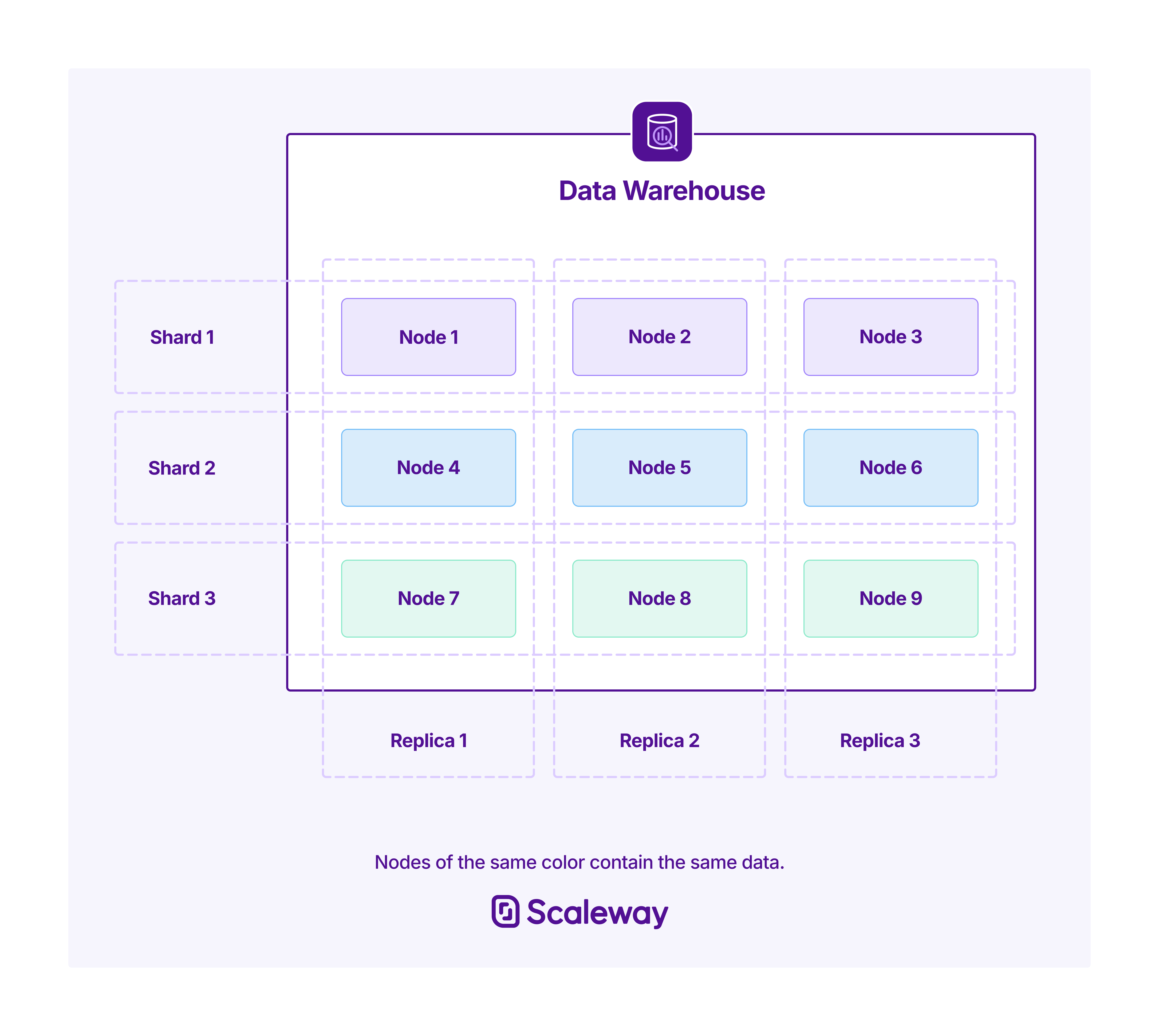
Scaleway Data Warehouse for ClickHouse® uses a distributed architecture that splits data across multiple shards, each of which is replicated across multiple nodes for fault tolerance.
When you create a deployment, you specify the number of shards and replicas in the configuration:
-
Sharding splits your data across shards, enabling horizontal scaling and parallel query processing. Each shard contains a distinct subset of your total data.
-
Replication creates copies of each shard on separate nodes, ensuring availability and durability if a node fails.
The total node count of your deployment is:
Total nodes = Shard count × Replica count
For example, a deployment with 2 shards and 3 replicas runs on 6 nodes. Your data is split across 2 shards, and each shard has 3 identical copies.
View your shard and replica configuration
You can check the shard and replica counts in two places:
-
Deployments list — counts are shown alongside each deployment.
-
Deployment Overview tab — click a deployment name to see the full configuration in the Overview tab.
Inspect the cluster topology
For a detailed view of your cluster architecture, query the ClickHouse® system tables. Connect via the ClickHouse® CLI or the HTTP console, then run:
SELECT cluster, host_name, shard_num, replica_num, is_local
FROM system.clusters
WHERE cluster = 'scw';
This returns information about each node in your cluster:
| Column | Description |
|---|---|
cluster | The name of the cluster (always scw for Scaleway Data Warehouse) |
host_name | The hostname of the node |
shard_num | The shard number this node belongs to |
replica_num | The replica number within the shard |
is_local | Returns 1 (true) only for the node you are currently connected to, 0 (false) for all other nodes |
This query provides a complete view of how your nodes are organized across shards and replicas, helping you understand the physical distribution of your data and the role of each node in the cluster.
Use distributed tables
The Distributed table engine routes queries across all shards in your cluster. A distributed table stores no data itself, instead it acts as a proxy that routes queries to underlying local tables on each shard. Reading is automatically parallelized across shards.
This requires two tables:
- A local table on each shard that physically stores data.
- A distributed table that routes queries to those local tables.
Choose a sharding key
Before creating your tables, decide on a sharding key — an expression ClickHouse® evaluates per row to determine which shard receives it. This choice matters for both query performance and data distribution.
Common sharding key examples:
| Sharding key | When to use it |
|---|---|
cityHash64(user_id) | User-centric queries — rows for the same user always land on the same shard |
toYYYYMMDD(timestamp) | Time-series data where queries filter by date range |
region_id | Data that is frequently filtered by geographic region |
rand() | No dominant query pattern — prioritizes even distribution |
Choose your sharding key carefully based on your query patterns. A well-chosen sharding key ensures even data distribution and lets ClickHouse® route queries efficiently to specific shards.
Create a local table
Create the local table that stores data on each shard. This table uses a standard table engine like ReplicatedMergeTree.
Execute this query once — ClickHouse® propagates it to all shards automatically: :
CREATE TABLE mytable_local
(
    id UInt64,
    timestamp DateTime,
    user_id UInt32,
    event_type String,
    value Float64
)
PARTITION BY toYYYYMM(timestamp)
ORDER BY (id, timestamp);
Create a distributed table
Once the local tables exists, create a distributed table that references it:
CREATE TABLE mytable_distributed
(
    id UInt64,
    timestamp DateTime,
    user_id UInt32,
    event_type String,
    value Float64
)
ENGINE = Distributed('scw', 'default', mytable_local, cityHash64(user_id));
The Distributed engine takes the following parameters:
ENGINE = Distributed(cluster_name, database_name, local_table_name, sharding_key)| Parameter | Description |
|---|---|
cluster_name | The name of the cluster ('scw' for Scaleway Data Warehouse) |
database_name | The name of the database containing the local table |
local_table_name | The name of the local table that stores the data |
sharding_key | An expression used to determine which shard receives each row |
Query the distributed table
Once both tables exist, insert and query data through the distributed table:
-- Insert data (automatically distributed across shards)
INSERT INTO mytable_distributed
SELECT * FROM source_data;

-- Query data (automatically parallelized across shards)
SELECT
    user_id,
    count() as event_count
FROM mytable_distributed
WHERE timestamp >= now() - INTERVAL 7 DAY
GROUP BY user_id;
For more details on the Distributed table engine, see the official ClickHouse® documentation.