Understanding Site-to-Site VPN
This document covers the features, use cases, pricing and technical details of Site-to-Site VPN.
Overview
Site-to-Site VPN lets you securely connect your Scaleway VPC to your remote infrastructure, enabling encrypted data exchange over a private VPN tunnel. Integrated with VPC routing, traffic destined for your remote infrastructure can reach it from your VPC via the secure VPN tunnel, and vice versa. Site-to-Site VPN connections are secured with Internet Protocol security (IPsec).
Scaleway Site-to-Site VPN consists of:
- A VPN gateway: the connection point on the Scaleway side
- A customer gateway: the connection point on the remote side (representing a corresponding physical customer gateway device)
- A routing policy: defines the traffic allowed to flow through the tunnel
- A connection: brings together the three above elements, and defines the encryption and configuration for the VPN tunnel
You must create all of the above elements, and correctly configure your customer gateway device, for a functional Site-to-Site VPN.
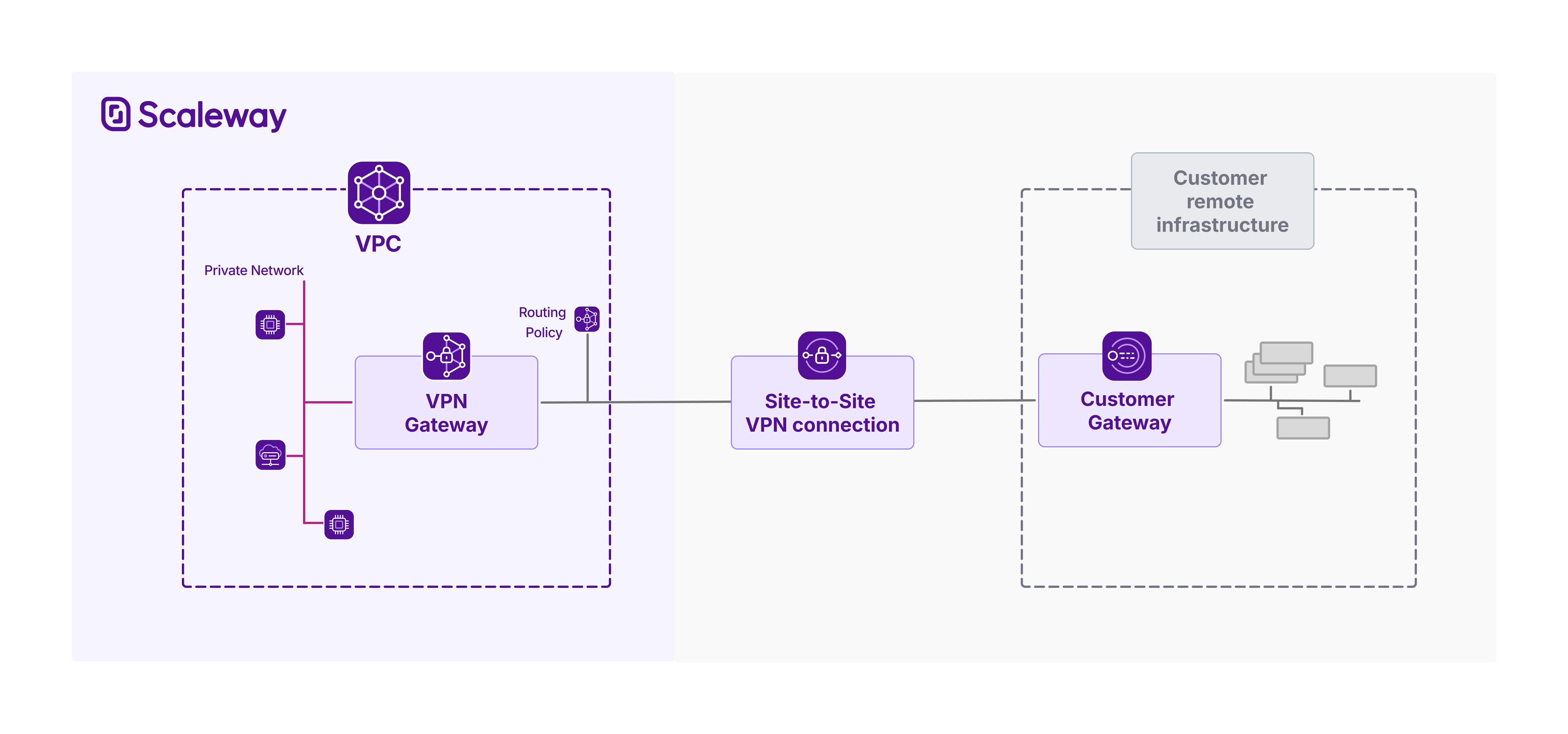
Encrypted network interconnection with IPsec
Site-to-Site VPN enables encrypted connections between your Scaleway VPC and remote networks, whether that is your on-premises infrastructure, a remote office, or even a VPC in another cloud provider.
Site-to-Site VPN's tunnel is secured using IPsec (Internet Protocol Security), a robust suite of protocols that ensures data confidentiality, integrity, and authentication across untrusted networks like the internet.
You can define your own IPsec security proposals to control exactly which encryption and authentication methods are used to secure the tunnel, giving you fine-grained control over the balance between security, performance, and compatibility. Scaleway supports a wide selection of modern cryptographic options across key protocols like IKEv2 (used for secure key exchange and tunnel negotiation) and ESP (which encrypts and authenticates the actual data payloads). This flexibility ensures your Site-to-Site VPN can integrate smoothly with diverse networking equipment while maintaining the right level of security and performance for your use case.
High availability with multi-AZ gateway redundancy and dual tunnels
Ensure high availability by deploying two VPN gateways across separate Availability Zones (AZs) and establishing redundant tunnels for resilient connectivity. This architecture - aligned with Scaleway’s SLAs - provides failover protection against AZ outages. For maximum resilience, assign both a public IPv4 and IPv6 address to each gateway, then create two connections: one using IPv4 addresses, the other IPv6. This delivers two layers of redundancy: first at the infrastructure level (gateways in different AZs), and second at the connectivity level (dual-stack tunnels).
The public IP address type used to establish the tunnel does not restrict the type of IP traffic that can flow through that tunnel. You define the types of traffic flow (IPv4 and/or IPv6) that you want to allow by attaching (or not) a routing policy for that traffic type. Learn more about this.
Dynamic routing with BGP integration
Site-to-Site VPN integrates the Border Gateway Protocol (BGP) to allow dynamic route exchange between the remote network and Scaleway. Via BGP, the VPN gateway and the customer gateway can automatically exchange routing information, each advertising the IP prefixes of their respective internal subnets. This dynamic communication ensures that both sides are always aware of reachable destinations, allowing traffic to be routed efficiently across the tunnel as network conditions or topologies change.
Note that by default, all routes through a VPN tunnel are blocked. This is a security measure to prevent unintended traffic flow. You must explicitly define and attach a routing policy to each VPN connection, which acts as a filter to allowlist specific route announcements and allow controlled routing through the VPN tunnel. Each routing policy lets you specify outbound routes (prefixes from your Scaleway VPC that you want to advertise to the remote side) and inbound routes (prefixes from the remote network that you want to accept and route through the tunnel). One routing policy per IP family (IPv4 and/or IPv6) is required per connection.
- Outgoing routes are the IP prefixes that define ranges of Scaleway VPC route announcements to allow. Routes within these destinations will be propagated, allowing traffic from the remote gateway to be routed via the VPN to your VPC.
- Incoming routes are the IP prefixes that define ranges of route announcements from the customer gateway to allow. Routes towards these destinations will be propagated, allowing traffic from the Scaleway VPC to be routed via the VPN to your remote infrastructure. You can allow multiple outgoing routes and multiple incoming routes per policy.
After attaching routing policies, you can then activate route propagation on the VPN connection. When activated, the gateways establish a BGP peering session, dynamically sharing only the prefixes defined in the routing policy, thereby enabling secure and selective connectivity. This design gives you granular control over traffic flow while maintaining strong security and operational flexibility.
Use cases
| Use case | Description |
|---|---|
| Connect on-premises infrastructure to your Scaleway VPC | Securely extend your local data center or office network into your Scaleway VPC using an encrypted Site-to-Site VPN tunnel. This enables smooth access to cloud resources as if they were part of your internal network, supporting hybrid cloud architectures with consistent routing and security policies. |
| Connect your Scaleway VPC to infra in other clouds | Establish a controlled and encrypted connection from your Scaleway VPC to your infrastructure hosted by other cloud providers. By defining strict routing policies and using IPsec encryption, you ensure only authorized traffic flows between networks, maintaining security and compliance while supporting multi-cloud architectures. |
Technical info: requirements and availability
Requirements
Before creating a Site-to-Site VPN connection, ensure you have already:
- Created a Scaleway account and added a payment method
- Created a Scaleway VPC and created a Private Network within it
- Provisioned a real physical or software-based networking device, located on the remote network you want to connect to your Scaleway VPC, to act as your customer gateway device
Components and configuration
In order to create a working Site-to-Site VPN connection, you must:
- Create a VPN gateway and a customer gateway in the same Scaleway region.
- Create a VPN connection, selecting the VPN gateway and customer gateway pair to connect, and defining encryption and initiation parameters for the tunnel.
- Create a routing policy defining the incoming and outgoing route advertisements to allow over the connection, then attach this policy to the connection. If you want the connection's tunnel to support both IPv4 and IPv6 traffic, attach one routing policy for each IP type.
- Configure your customer gateway device so that it correctly supports the VPN tunnel from its side.
- Activate route propagation on the VPN connection to trigger the dynamic exchange of route information between the gateways, and allow traffic to flow through the VPN tunnel.
You can verify whether the Site-to-Site VPN is functioning as it should by checking the status of its various components.
Availability
Site-to-Site VPN is available in multiple different Regions and Availability Zones. For the most up-to-date information, check out the Scaleway console or the Product Availability page.
Features
Site-to-Site VPN offers the following features:
-
Customizable routing policies (create and attach routing rules) – Define which IP prefixes are allowed for inbound and outbound route advertisement. Each policy filters traffic by source and destination ranges, ensuring only authorized subnets are reachable over the VPN tunnel.
-
BGP-based dynamic routing (enable/disable route propagation) – Dynamically exchange routing information between the VPN gateway and customer gateway using BGP. Activate route propagation to initiate the BGP session(s) and enable traffic flow based on attached routing policies.
-
Flexible IPsec security proposals (customizable encryption) – Tailor the security of your VPN tunnel by selecting specific encryption, integrity, and key exchange algorithms, balancing security, performance, and compatibility with your customer gateway.
-
Dual-tunnel support for high availability – Create two connections between the same VPN gateway / customer gateway pair to establish dual tunnels for redundancy, ensuring continuous connectivity during network failovers or maintenance.
Limitations and compatibility
The following limitations apply:
- You cannot use Site-to-Site VPN to connect two Scaleway VPCs
- You cannot modify the Private Network that a VPN is connected to after creation
- You must use the auto-generated pre-shared key (PSK) for a VPN connection: you cannot currently define your own PSK
- We cannot currently provide a configuration file for customer gateway devices
- You cannot define static routes manually, as Site-to-Site VPN only supports dynamic routing
- IKEv2 SA lifetime is limited to four hours, and ESP SA lifetime is limited to one hour. Automatic key renewal ensures optimal security by mitigating the risk of key compromise, preventing statistical traffic analysis, and ensuring Perfect Forward Secrecy.
Pricing
Site-to-Site VPN is priced at an hourly rate. The rate differs based on the VPN gateway offer type that you choose. The following two elements of each offer type influence the hourly rate:
- Bandwidth, i.e. the maximum data transfer capacity the gateway can handle at any given time. The higher the bandwidth capacity, the higher the hourly rate.
- Max connections, i.e. the maximum number of VPN connections the gateway can be used for. The more connections, the higher the hourly rate.
It is currently not possible to upgrade a VPN gateway to a more powerful offer type after creation.
You are billed for a VPN gateway from the moment you create it, until you delete it. You can delete a VPN gateway at any time.
Note that:
- The public IPv4 address attached to a VPN gateway incurs a separate charge, with its own hourly rate.
- The auto-generated PSK for a VPN connection incurs a separate storage charge from Scaleway Secret Manager, with its own hourly rate.
For full pricing details, see our dedicated pricing page.
Going further
Ready to get started with Site-to-Site VPN? Check out these pages:
- Site-to-Site VPN Quickstart - Learn how to set up and configure your Site-to-Site VPN via the Scaleway console.
- Site-to-Site VPN API Reference - Full documentation for managing Site-to-Site VPNs via the Scaleway API
- Site-to-Site VPN Terraform Documentation - Integrate Site-to-Site VPN into your infrastructure as code with the Scaleway Terraform Provider.
- Site-to-Site VPN FAQ - Get answers to the most frequently asked questions about the Site-to-Site VPN.